
LoreFountain
A Fountain-native worldbuilding layer for VS Code — and for every AI coding agent already in your editor.
Link your screenplay's character cues and scene headings to structured, plain-Markdown entity files — with typed relationships, hover previews, autocomplete, and backlinks. Files are the source of truth. No database to migrate to, no lock-in.
Works in VS Code, Cursor, Windsurf, and Antigravity
Worldbuilding lives in your head, a pile of scattered notes, or a wiki nobody updates.
Screenwriters and showrunners already do the real work in Markdown and Fountain. LoreFountain doesn't ask you to change tools or migrate to a database — it reads the files you already have and makes every character cue, scene heading, and mention clickable, hoverable, and searchable.
Files are the source of truth. The index is disposable.
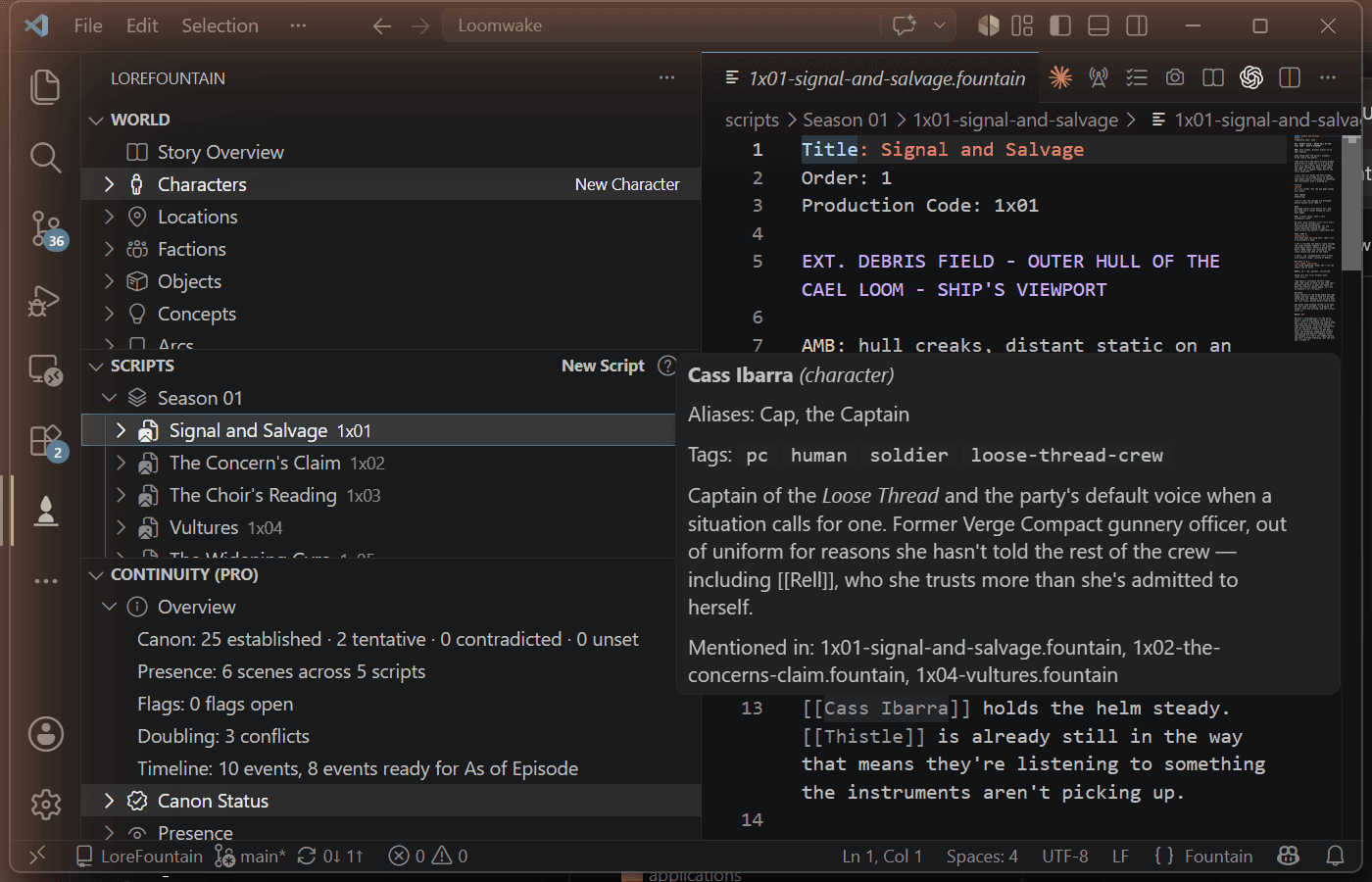
Never leave the script to remember who someone is.
Hover any recognized character, location, or object mention and LoreFountain shows its full Story Card — aliases, tags, typed relationships, and description — right where you're writing. Works the same whether you're in a hard sci-fi space opera or a period gothic drama.
Free. Forever. The whole core.
The free tier is fully built — not a trial, not a teaser.
Six entity types
Character, location, faction, object, concept, and arc — each one a plain Markdown file with YAML frontmatter. Nothing proprietary, readable in any text editor.
Typed relationships & significance
Deliberate, typed links between entities — separate from automatic mentions — plus Main / Supporting / Minor grouping in the World tree.
Hover previews & autocomplete
Every character cue, scene heading, and [[mention]] in a .fountain script becomes clickable and hoverable — full Story Card on hover, no context-switching.
Dual-ordered Timeline
Track where an event is presented to the audience and where it falls in the story's own chronology — independently, since they don't always match.
Structured Search
Search across your entire world by type, tag, or canon status — not a flat text grep through a folder of notes.
Story Card & Story Overview
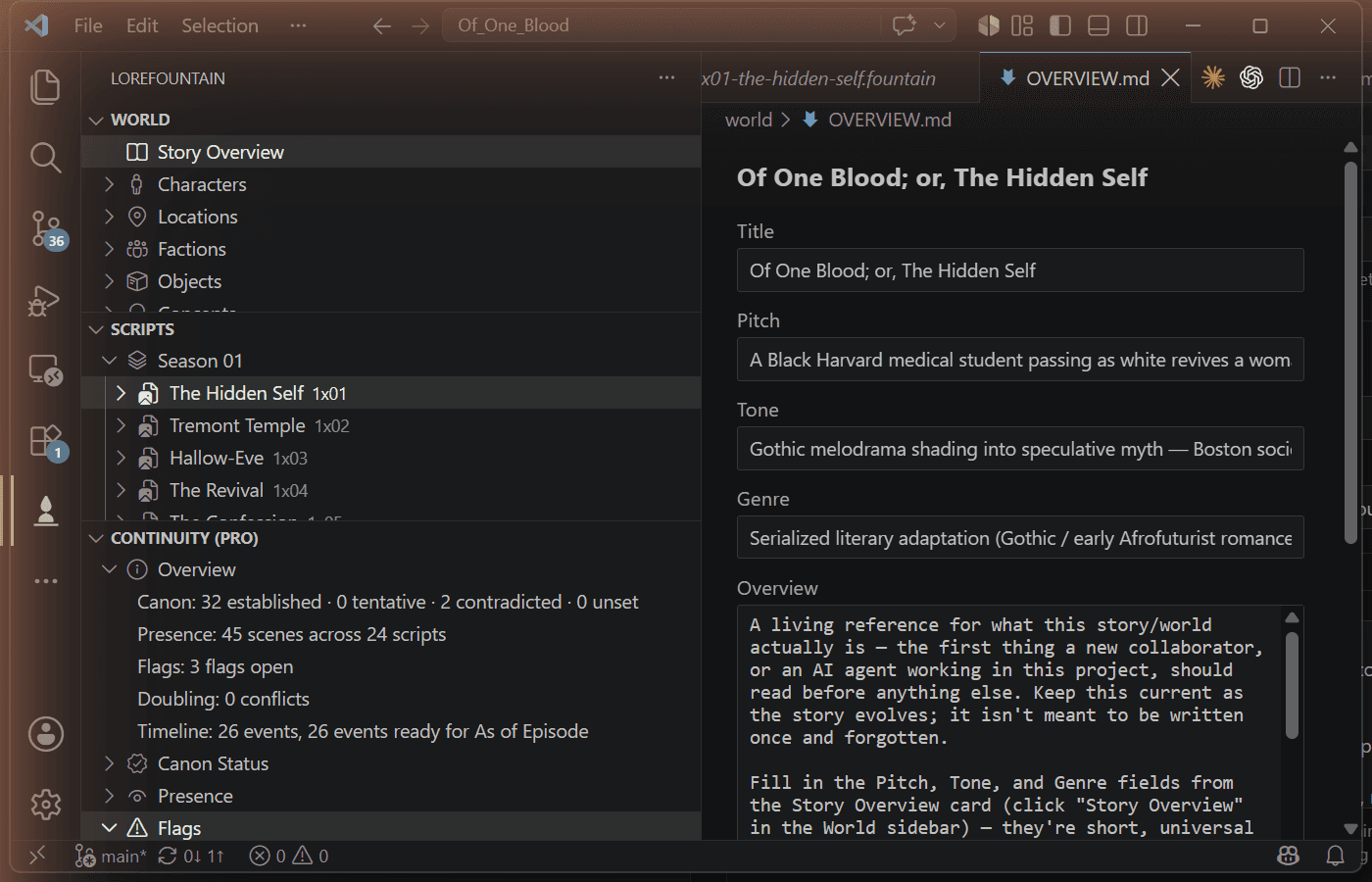
Entities open as a form instead of raw text. A single OVERVIEW.md keeps title, pitch, tone, and genre current as the first thing a new collaborator reads.
Rename with propagation
Rename an entity once — every reference across your scripts and other entity files updates with it. Broken-reference detection catches what doesn't.
Headless validate.js
A CI- and agent-friendly validator with zero VS Code dependency — run it in a pipeline or from a terminal-only agent session.
One document a new collaborator actually reads first.
Every LoreFountain project gets a Story Overview — title, pitch, tone, and genre as short structured fields, plus one freeform section for whatever the project actually needs. It opens as its own card, not a wall of prose, and it's the first thing LoreFountain tells an AI agent to read before touching anything else.
Installing LoreFountain
It's a normal VS Code extension. No account, no server, no separate app.
- 1
Install the extension
In VS Code, open the Extensions view, search
LoreFountain, and click Install — or grab it directly from the VS Code Marketplace. On Cursor, Windsurf, Antigravity, or another VS Code fork, use the same Extensions search — those pull from Open VSX instead of the Microsoft Marketplace, and LoreFountain is published there too. Source is on GitHub. - 2
Open a project
Point it at a folder with .fountain scripts, or start blank — LoreFountain creates world/, scripts/, and imports/ on first use. Folder names are configurable via a lorefountain.config.json at the project root.
- 3
Try the built-in walkthrough
Command Palette →
LoreFountain: Try LoreFountainscaffolds a small sample workspace — two entities, a glossary term, and a script — so you can see it working before touching your own project. - 4
Create your first entity
Command Palette → New Character (or any entity type), or just start referencing a name in a script — LoreFountain will offer to create it for you.
- 5
Link it in a script
Reference an entity as a character cue, in an action line, or wrapped in [[double brackets]]. LoreFountain finds it automatically — hover any recognized mention to preview its Story Card.
- 6
See it at real scale
Command Palette →
LoreFountain: Install a Demodownloads a finished sample project — dozens of entities, a full season of scripts — and opens it in a new window.
No AI features in the extension. On purpose.
LoreFountain doesn't compete with the AI coding agent you already use — it structures your world's data so that agent works better.
How it works today: AGENTS.md
On first use, LoreFountain writes an AGENTS.md file (plus a small agents/ folder) at your project root — plain instructions any file-reading AI agent picks up automatically, before it touches your project. It explains what world/, scripts/, and imports/ mean in this specific project, which doc to read for which kind of edit, and to run node agents/validate.js after a batch of changes — a headless check with zero VS Code dependency, so it runs the same in a terminal-only agent session or a CI pipeline.
Claude Code, Cursor, Windsurf, GitHub Copilot — any agent that reads files from disk gets full context on your world's structure automatically. No server to run, no extra setup.
On the roadmap: native MCP support
A native Model Context Protocol server — exposing your world as live MCP tools and resources, instead of files an agent reads from disk — is planned for teams who specifically want that integration. It isn't built yet. Until it ships, every agent that already reads AGENTS.md gets equivalent context for free.
For a real writers' room and production pipeline.
Everything above is free, forever. Pro adds continuity tooling and production-format exports.
Continuity Management
Canon status tracking (established / tentative / contradicted), scene presence, and automatic continuity flags — catches contradictions like a character's first appearance being claimed in the wrong episode.
Doubling / casting conflicts
Automatically flags when the same actor would need to play two characters in the same scene — built for productions casting a small ensemble across a large world.
Entity Graph
A visual relationship map of your whole world, generated from the typed relationships you've already written.
Story-Bible Export
Turn your structured world into a clean, shareable story bible document.
BBC Radio Drama Export
Export scripts to proper radio drama formatting and cue conventions.
SFX / Cue-Sheet & Shot List Export
Production-ready cue sheets and shot lists generated directly from your scripts and entities.
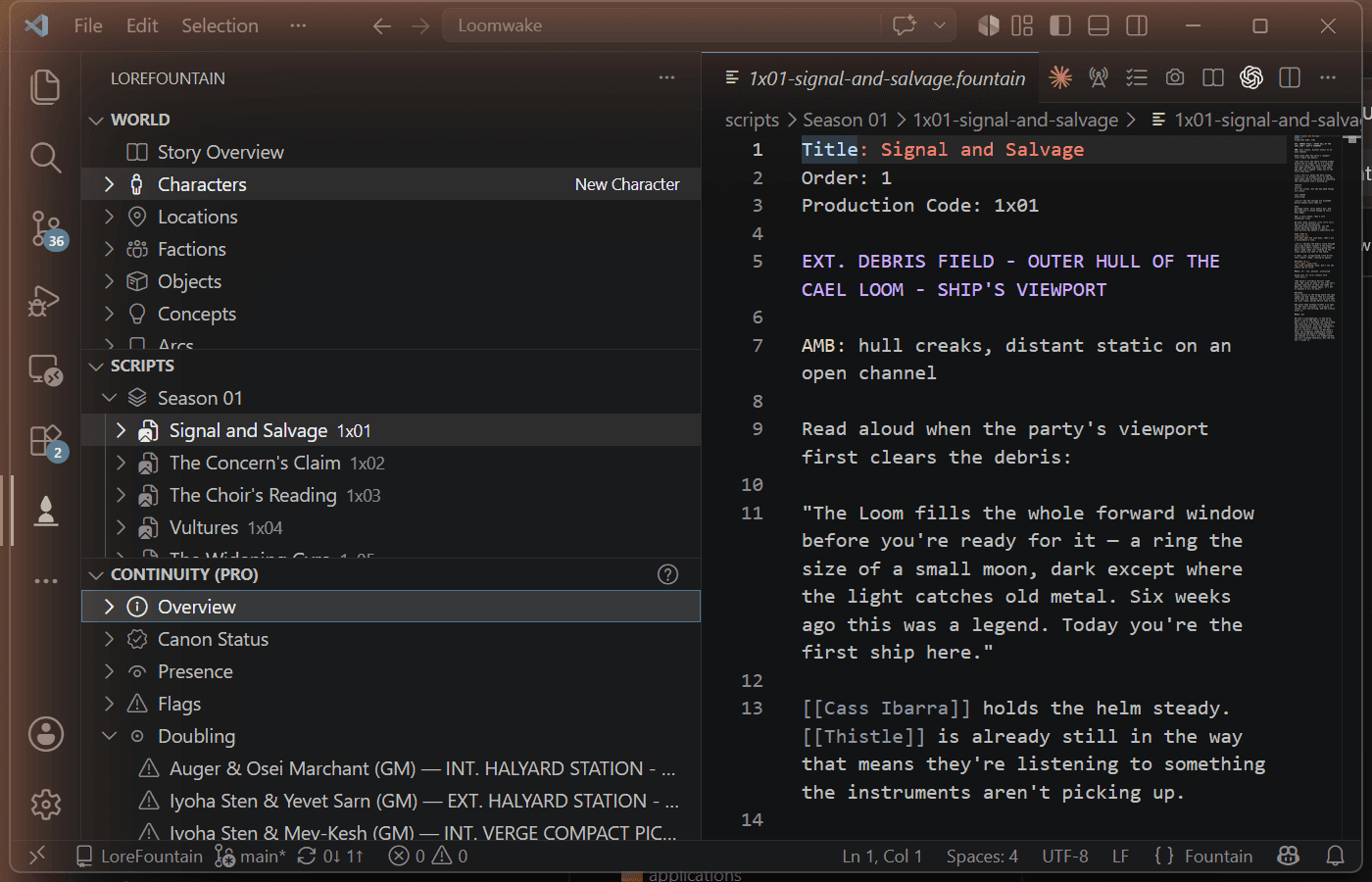
Doubling conflicts, flagged automatically
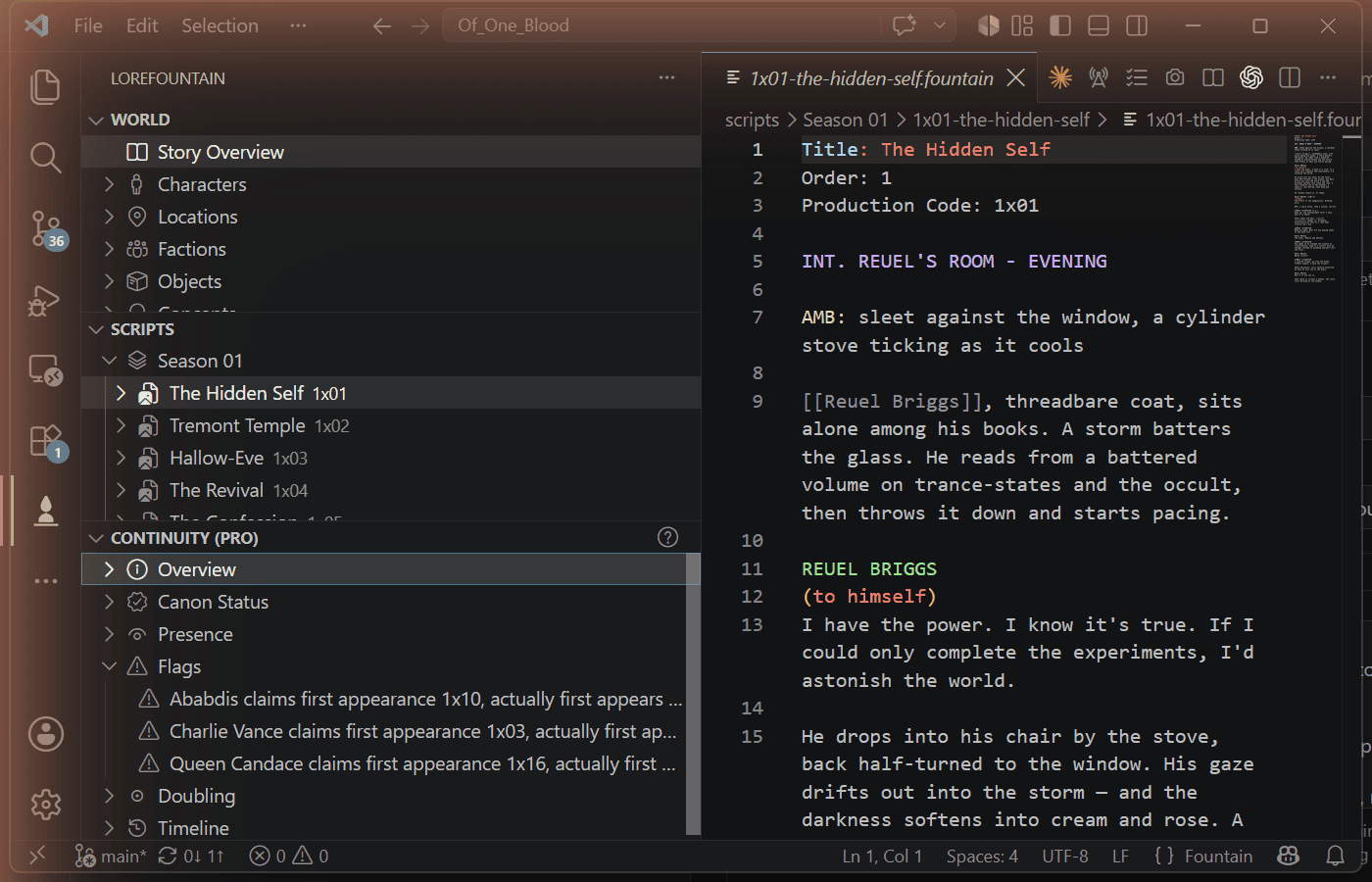
Continuity flags catching a contradiction
LoreFountain Pro pricing
One license, activated with a single command once you've got a key.
Every tier unlocks the same features. Free core stays free forever, no matter what you choose here.